
51% off on product page · save $1218.82
Ergonomic Executive Office Chair: Benefits and Fit Tips
Back support can make it easier to sit upright without holding yourself in a stiff pose. When you sit fully back, the chair should support your back while still letting you reach your work at a natural distance. Support should feel useful during ordinary activities, such as reading a document or joining a video call, rather than only when you lean back and stop working.
Seat height matters just as much. Aim to rest your feet comfortably on the floor or a footrest, with your thighs supported and no uncomfortable pressure behind your knees. Your shoulders should remain relaxed when your hands are at the keyboard. If getting your feet into position leaves the desk too high for your arms, a footrest or a change to the desk setup may help more than another chair adjustment.
A chair is one part of the workstation. Monitor placement, keyboard position, and room for your arms all affect how comfortably you sit. The OSHA Computer Workstations eTool offers chair guidance you can use alongside a broader look at your desk.
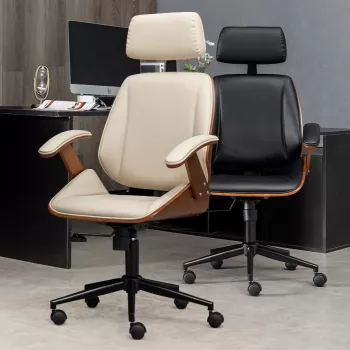
Sit fully back, then place your hands where you normally type. Notice whether you must lean forward, raise your shoulders, or bend your wrists sharply. Look at your screen from that position: if you need to crane toward it, changing the monitor setup may help more than changing the chair.
Before choosing our Benefits of the Ergonomic Executive Office Chair, compare its dimensions and confirmed adjustments with your body, desk clearance, and available floor space. Do not assume an adjustment is present or that its range will suit you.
Featured in this guide
Benefits of the Ergonomic Executive Office Chair
The 90-90-90 rule is a starting point: aim for roughly right angles at your hips, knees, and elbows. You do not need to hold exact angles all day. Supported feet, relaxed shoulders, and the freedom to change positions are more useful than trying to maintain one perfect posture.
For a quick fit test, sit fully back and notice whether the seat supports your thighs comfortably. Put your hands where you would normally type. Do your shoulders rise, do your elbows drift far from your body, or do your wrists bend sharply? Then look at your screen from your usual working position. If you have to lean forward to see it, the monitor may need attention even if the chair feels good.
Use this table to separate chair adjustments from desk changes:
A quick chair-and-desk fit check
| Check | What to look for | If it feels off |
|---|---|---|
| Feet and knees | Feet supported; knees comfortable rather than pressed against the seat | Revisit seat height or consider a footrest |
| Back | Back supported while sitting at a natural distance from the desk | Adjust your position and assess available back-support settings |
| Arms and shoulders | Shoulders relaxed; elbows near your body | Recheck desk height and any available armrest settings |
| Movement | Room to shift position and stand periodically | Build brief movement breaks into your workday |
Even a chair that fits well cannot make sitting still indefinitely a good goal. Shift positions when you need to and take opportunities to stand and move. For more guidance on arranging the whole workstation, see the Mayo Clinic’s office ergonomics guide.
An executive chair can give a home office or professional workspace a polished look, but appearance should come after fit and function. A larger chair may take up valuable floor space or interfere with a compact desk. A higher price also does not automatically mean a better match for your proportions or the way you work.
If you are considering our Benefits of the Ergonomic Executive Office Chair, review its current specifications, price, and availability before deciding. Compare its listed dimensions with your desk clearance and the adjustments you need. Our team would rather you make room for a chair that works in your space than choose one on style alone.
Comfort away from the desk matters, too. A hands-on hobby, such as our Animal Building Block Set with Dust Cover, can be a reason to step away after work. It is not a substitute for brief movement breaks during your workday.
A chair that fits your body and workspace can provide comfortable support and make a workable sitting position easier to maintain. The benefits depend on fit, the rest of your setup, and regular movement.
We cannot verify which chair he currently uses. For your own workspace, chair dimensions and fit are more useful considerations than someone else’s choice.




Leave a comment